The operating system for furniture retail, built for the AI era
Run your furniture business on one system that does the paperwork for you.
Furniture OS sells, fulfils and reports for every brand and store you run. Its AI reads your bills, sorts your email and drafts your follow-ups, so your team reviews instead of retypes.
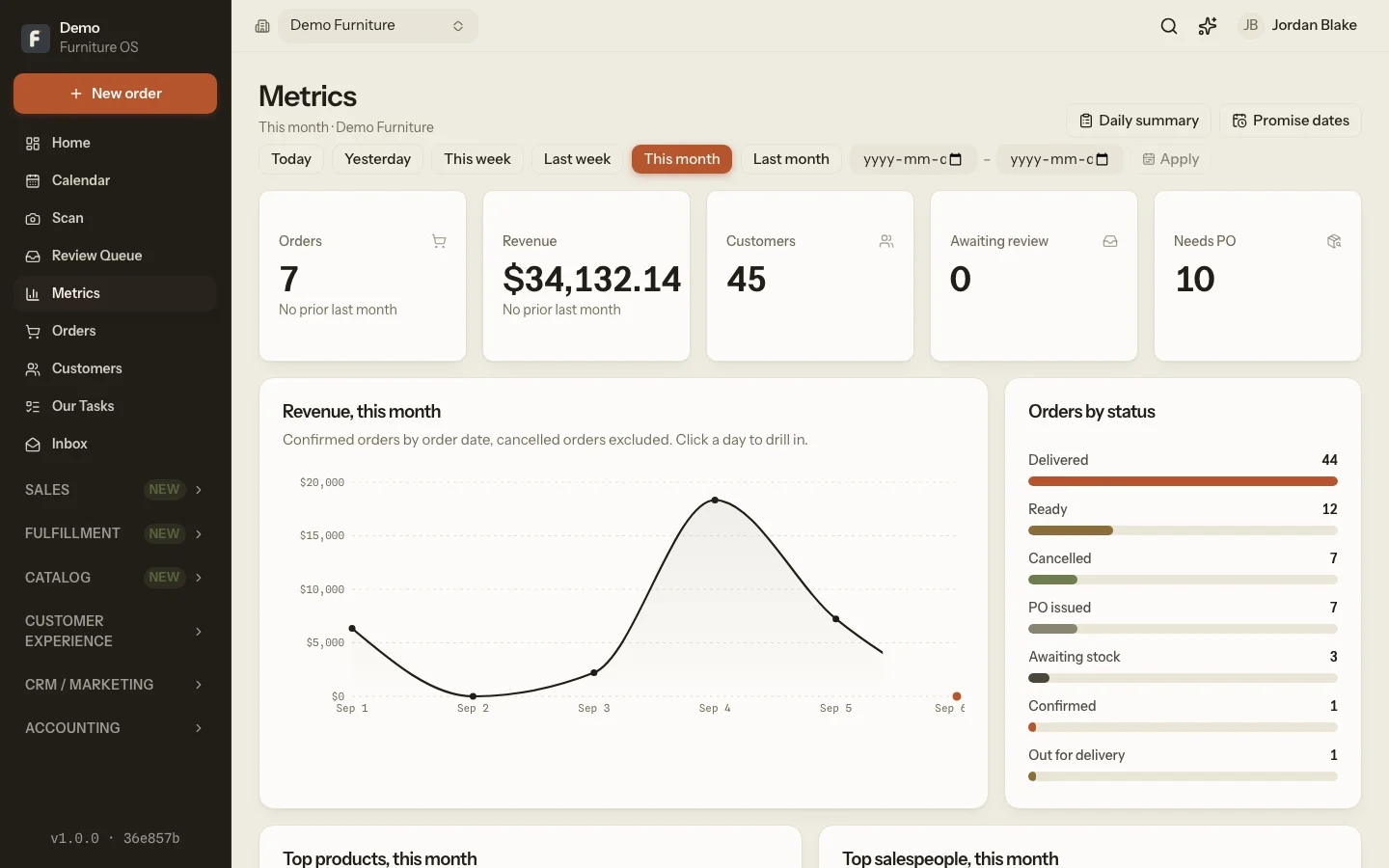
Built inside a multi-store, multi-brand furniture retailer, not in a software company. The owner runs their own stores on it, and what the floor learns each week goes back into the product.
- Every day
- used on the sales floor, in the warehouse and on the truck
- 10,000+
- vendor prices resolved behind a single quote
- 11
- automations that run every night without anyone asking
- 100%
- of AI changes reviewed by a person before they commit
Furniture retail still runs on paper, re-typing and memory.
Not because retailers are behind. Because the software they were offered was built for a different kind of shop. Furniture is special orders, long lead times, big tickets, deliveries and vendors with their own price books.
Bills typed twice
The sale is written up, then keyed into the POS, then keyed again into a PO, a spreadsheet and an email. Every re-type is a chance to be wrong.
Follow-ups forgotten
A couple leaves without buying. The salesperson means to call Thursday. Thursday is busy. The sale goes to whoever remembered.
Reports stitched by hand
Month-end means exporting three systems into one workbook to learn what you sold, what you made and what you owe in commission.
What the AI actually does
Five verbs. No magic, no black box.
Reads your paperwork
Photograph a sales bill, purchase order, packing slip, receipt or terminal batch report. Furniture OS extracts the lines, parties and totals and files it where it belongs.
Sorts your inbox
Every inbound email is classified, summarised and matched to the order or PO it belongs to. A shipping notice becomes an incoming shipment. A complaint becomes a service ticket.
Drafts your follow-ups
A visit that didn't close gets a six-touch, thirty-day sequence written from the salesperson's notes and the customer's actual objection. It pauses the moment the customer replies.
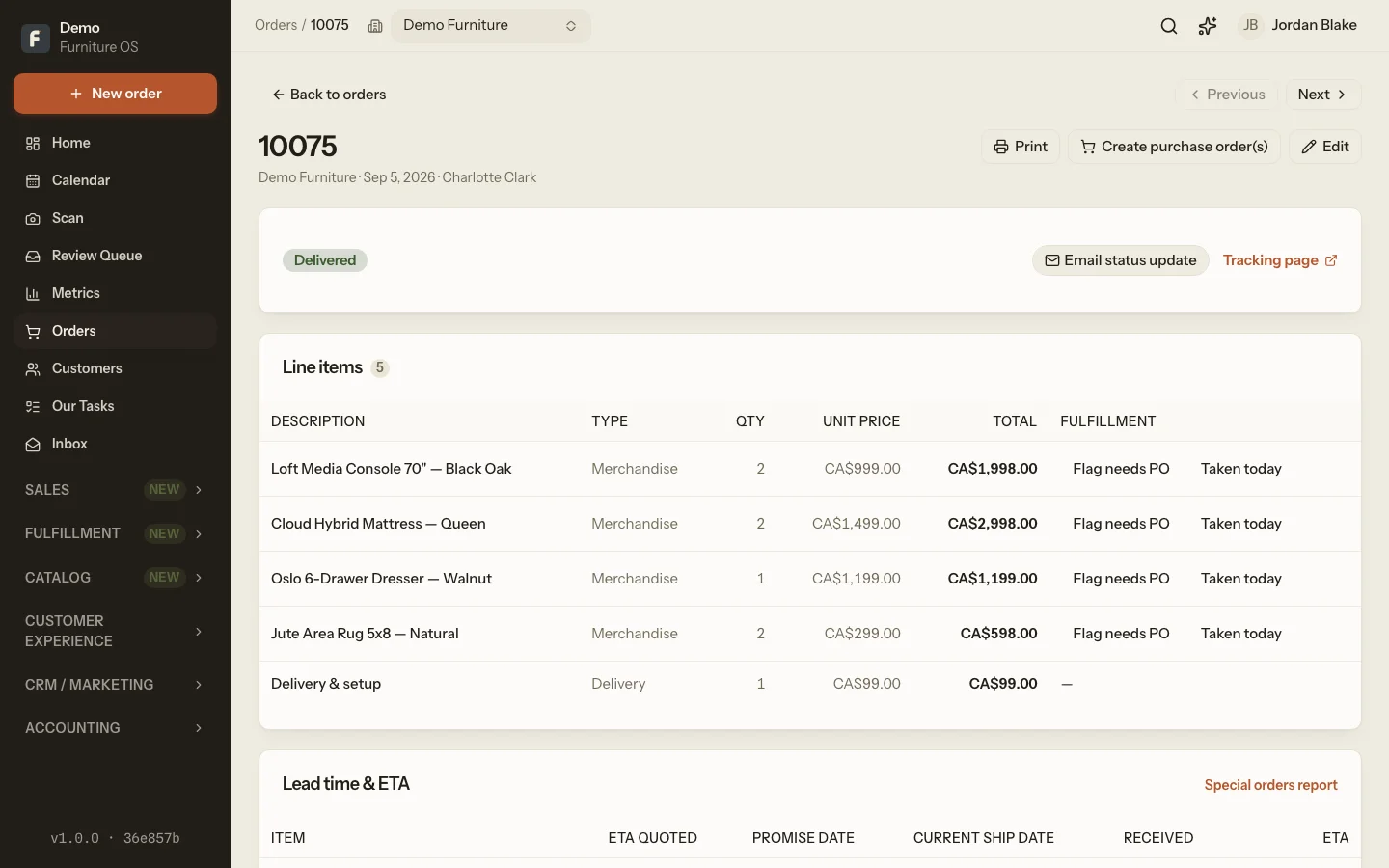
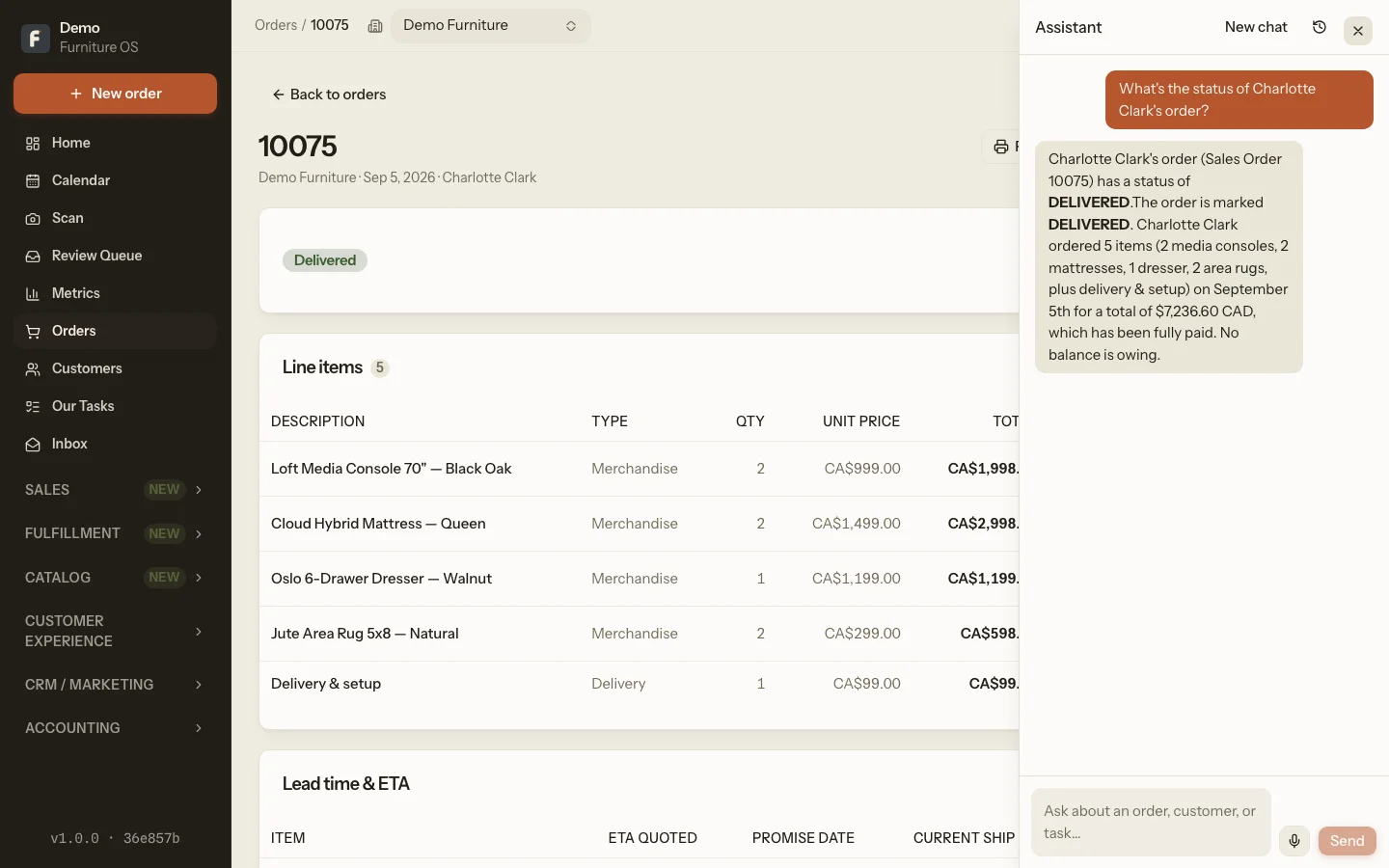
Answers your questions
Ask the assistant what's overdue, who bought the sectional last spring, or how much cash lands next week. It reads the same records your team does, scoped to what you're allowed to see.
Proposes, never executes
AI in Furniture OS suggests. A person approves. Every extraction lands in a review queue and every action is a card you confirm, so nothing changes your books unseen.
One system, the whole business
From the first quote to the last delivery photo.
Everything below is live today. Nothing is a roadmap slide.
Sell
- Point of sale with tax, tenders and financing
- Visual quotes built from vendor price lists
- Multi-manufacturer pricing engine
- Warranty plans with attach-rate reporting
- Commission by salesperson, down to the order
- Sample sign-outs and store credit
Fulfil
- Purchase orders emailed to suppliers
- Incoming shipments and receiving
- Special orders with promise dates
- Delivery scheduling and printable slips
- Service tickets with technicians
- A customer tracking page and a field app for crews
Know
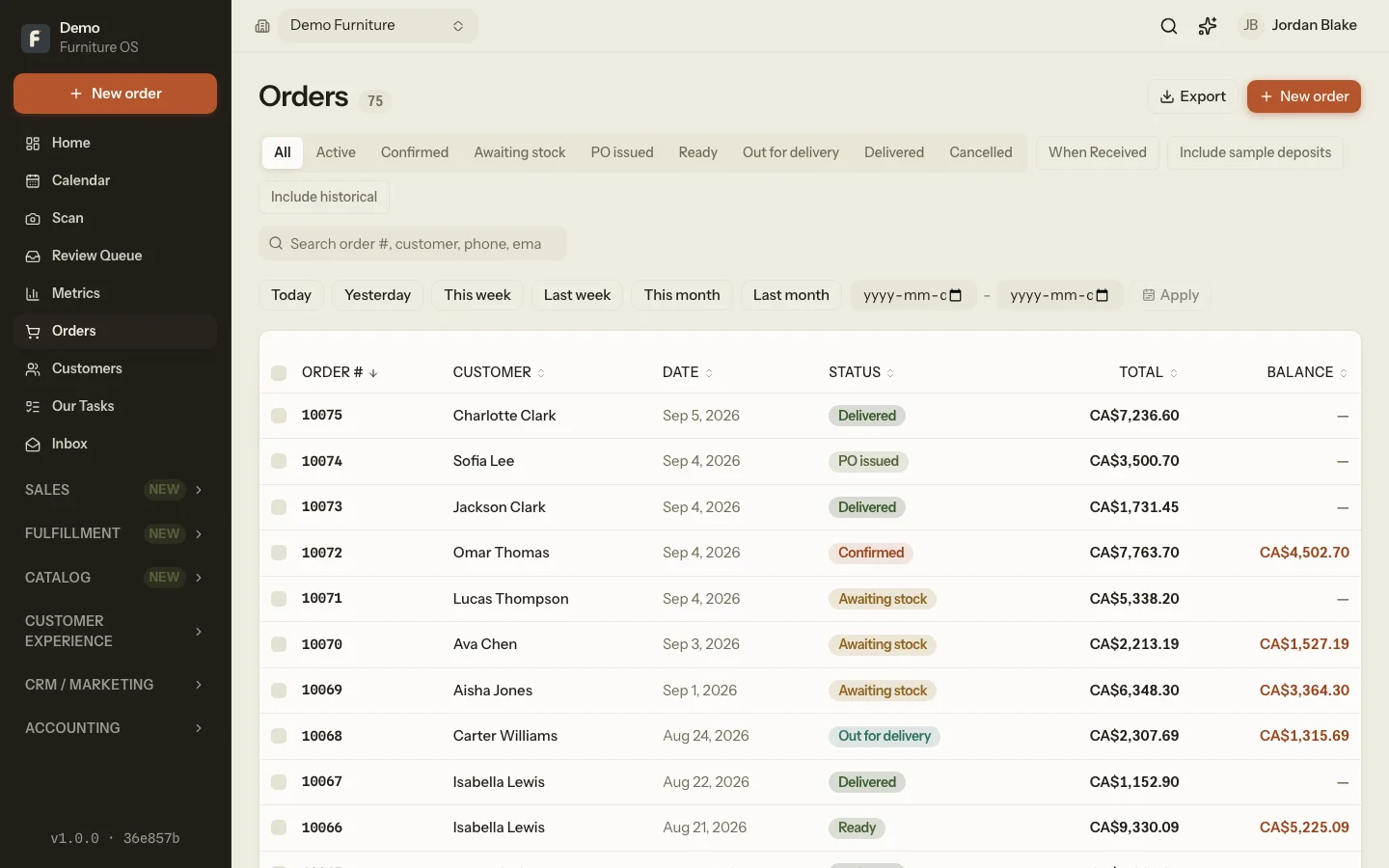
- Revenue, margin and year-over-year
- Daily sales summary and terminal reconciliation
- Ad spend and return on ad spend
- Accounting ledger and receivables aging
- Collections: when the cash actually lands
- Exports to CSV whenever you want them
Keep
- Customer 360 across orders, POs and tickets
- Segments and templated campaigns
- Automated status emails as orders move
- Shared tasks with reminders and voice notes
- One inbox for every brand's email
- Post-delivery review requests
How it works
Three steps. No rip-and-replace.
- 1
Keep your POS, or make Furniture OS the till
Stores on a legacy system like Anzio keep writing bills the way they do today; Furniture OS reads the printouts. Stores that are ready switch the till on and get numbering, tax and checkout in one place. Mix and match per store.
- 2
Scan, forward or drop your paperwork
Take a photo on your phone, forward an email, or post a file in a Slack channel. Furniture OS works out what it is and what it belongs to.
- 3
Review, approve, done
Extractions and suggestions wait in a queue. Someone glances, fixes anything odd, approves. Orders, POs, shipments and tickets update themselves from there.
Built for trust
Your books, your customers, your call.
Two-factor sign-in, enforced for managers
Managers and admins must enrol an authenticator. Everyone else can. Lost phone? An admin resets it with a recovery code.
Roles and regions, not one big password
Sales associates, supervisors, managers and delivery crews each see their own slice. A delivery role can never manage users.
Brand isolation as the first rule
Every query is scoped to the brand and store you're allowed to see. It's the invariant the whole codebase is tested against.
An audit log that only grows
Who proposed it, who approved it, when. Entries are appended, never edited.
Backups at a different vendor
The database and every uploaded file are copied nightly to storage that is deliberately not where the app runs.
A person approves every AI change
Models read and suggest. They don't write to your records. That's a design rule, not a setting.
Multi-brand, multi-store
One login. Every brand. Every store.
- Switch brands from the sidebar or see them all at once.
- Per-store numbering, timezone and print settings.
- Regional managers see their region. Owners see everything.
- Add a brand or a store in Settings, not in a support ticket.
Questions retailers ask first
›Do I have to replace my POS?
No. Many stores start by keeping their current system and letting Furniture OS read the printouts. When a store is ready, you switch it to Furniture OS as the till. It's a per-store setting.
›How does AI intake stay accurate?
Nothing commits without a person approving it. Extractions land in a review queue with the original image beside the extracted fields, low-confidence values are flagged, and unattended items expire rather than pile up.
›Who can see what?
Access is by role and region. A sales associate sees their own sales and commission. A manager sees their stores. A delivery crew sees today's stops. The platform enforces brand isolation on every query.
›How long does it take to get started?
A single store with one brand can be live in days: users, a price list and a scanned bill. Multi-brand groups take longer mostly because of price-list imports, which we do with you.
›What does it cost?
Pricing depends on stores and brands. Request a demo and we'll give you a straight number on the first call, not a quote after three.
›Does it work on phones and tablets?
Yes. Scanning, tasks, the assistant and the delivery-crew console are built for phones. The full workspace runs in any modern browser.
From the blog
Furniture industry news, and what technology is doing to it
Request a demo
See it running on a store like yours.
Two short steps. The second one asks about your stores and what hurts, so the walkthrough is about your business rather than a canned tour.
- · A reply from a person within one business day
- · A 30-minute walkthrough on a demo store
- · A straight answer on price